ReplyGuard for Outlook
Protect your company from the risk of inappropriate replies and reply alls
Prevent company errors and embarrassment by displaying a handy warning prompt each time a user chooses “Reply All.”
ReplyGuard for Office 365, Outlook 2021, 2019 & 2016

SendGuard for Outlook NOW AVAILABLE on iOS and Android!
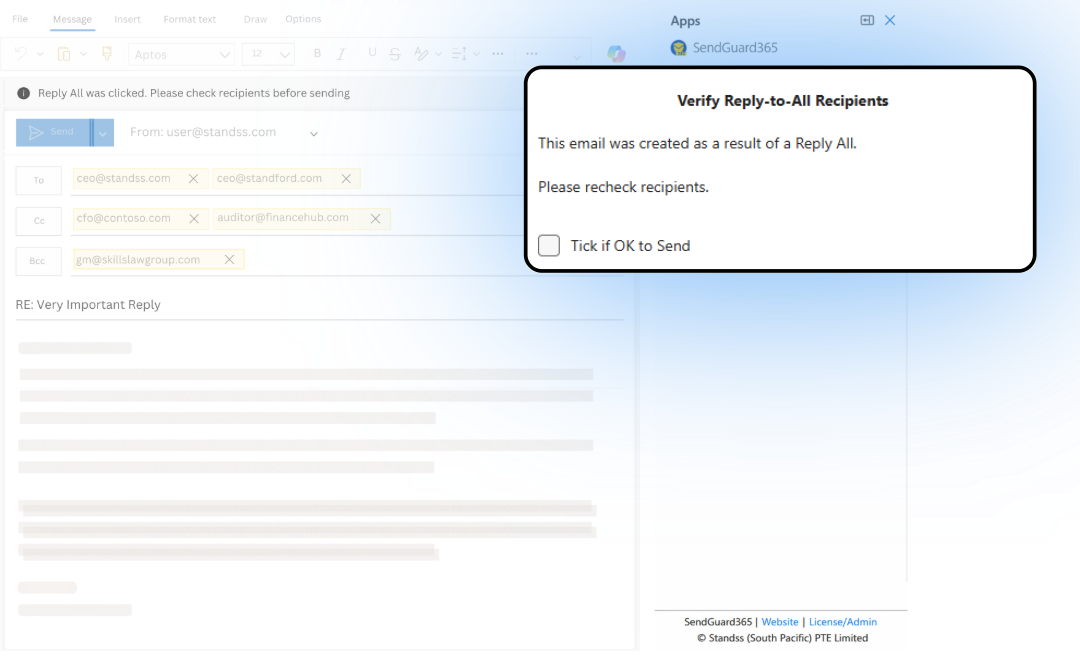
What are the Costs and Risks Of Inappropriate Replies and Reply-Alls?
Incorrect use of the Reply All button can result in embarrassment, waste productive time, waste your organization's bandwidth and storage space, and disclose confidential information. The wrong Reply All can be a major liability for your business.
ReplyGuard prevents these risks by stopping Reply All mistakes to begin with. Each time a user clicks send on an Outlook email with Reply All checked, ReplyGuard displays an in-depth warning prompt—reminding the user to check the recipients and message first.
Prevent Reply All Errors Before They Start with ReplyGuard for Outlook

- Prevent confidential information from
leaking:
ReplyGuard requires user confirmation to send mail,
reducing the risk of accidentally sending important data to unintended audiences.
- Reduce the server strain of accidental
Reply Alls:
Reply Alls to large groups can quickly consume bandwidth and storage space.
Avoid this issue by preventing Outlook Reply Alls from occurring.
- Minimize your legal liability as an organization: User actions are automatically recorded in the Windows Log or Text files, maintaining proof that a warning was displayed in Outlook.
ReplyGuard Features and Benefits
ReplyGuard is your safety net against accidental Reply All messages in Outlook. Reduce the risk of revealing sensitive information with these valuable features.
Get a warning every time you click Reply All
Review and confirm recipients when you click Reply All on an email with multiple recipients in Microsoft Outlook. ReplyGuard lets you remove unwanted recipients directly from the warning prompt.
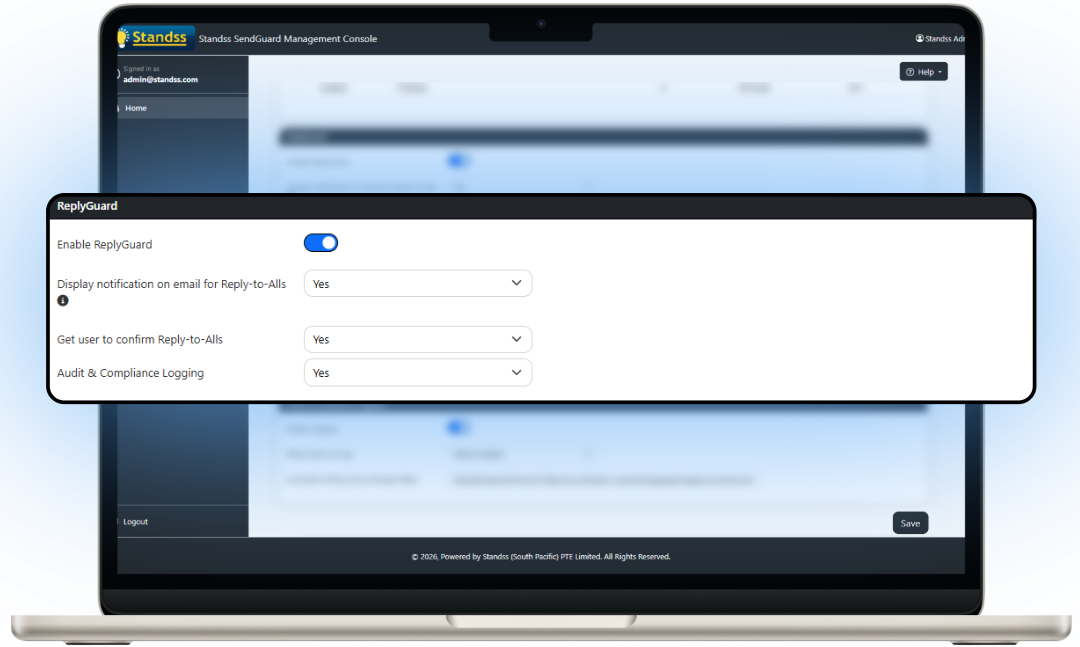
Control when the prompt is shown
Reduce prompt fatigue by controlling when warning messages are displayed, including external emails, internal emails, and other criteria.
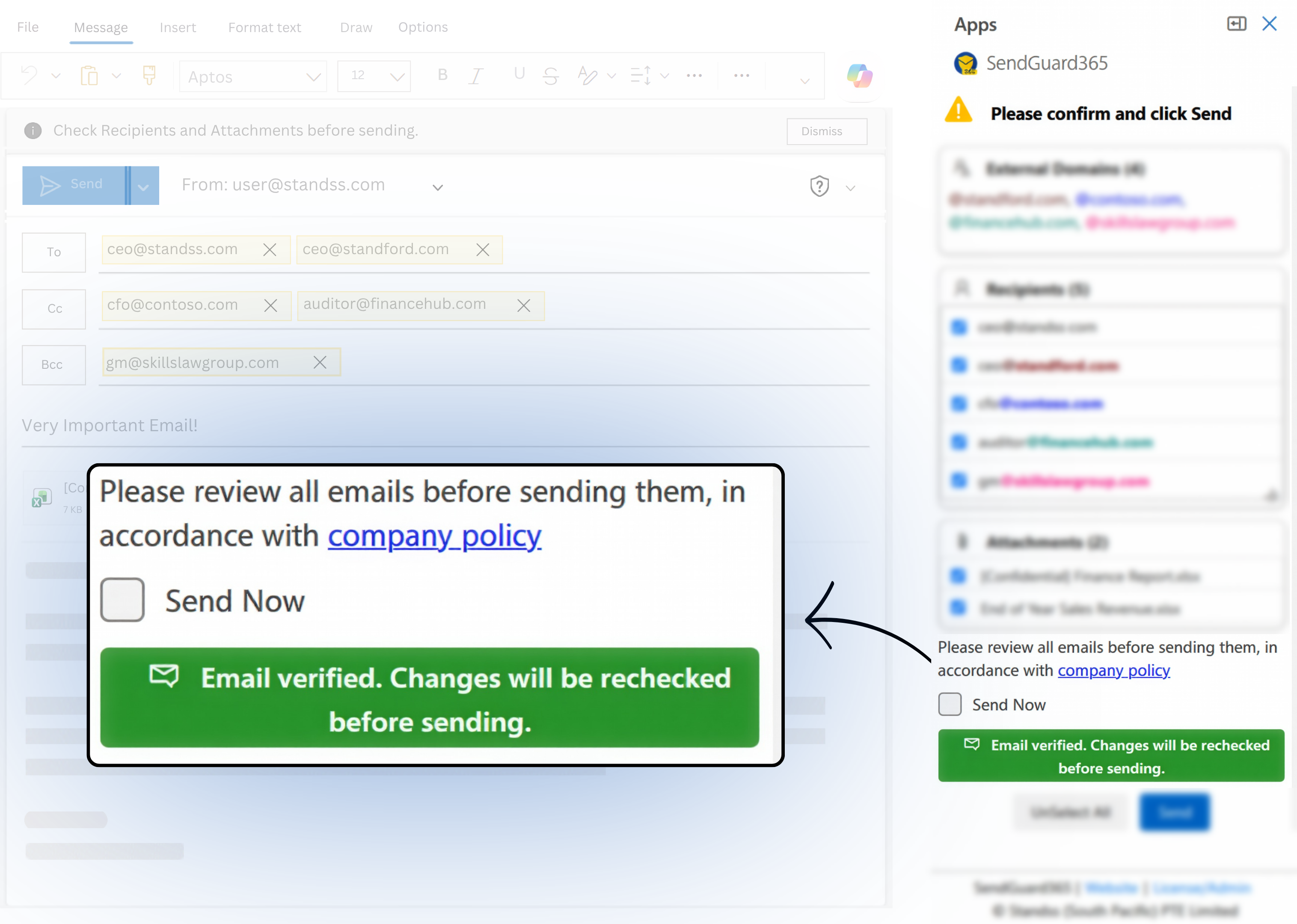
Display your company policies before each email
Customize the confirmation prompt with company branding and policy messaging so every outgoing message aligns with your organization's regulations.
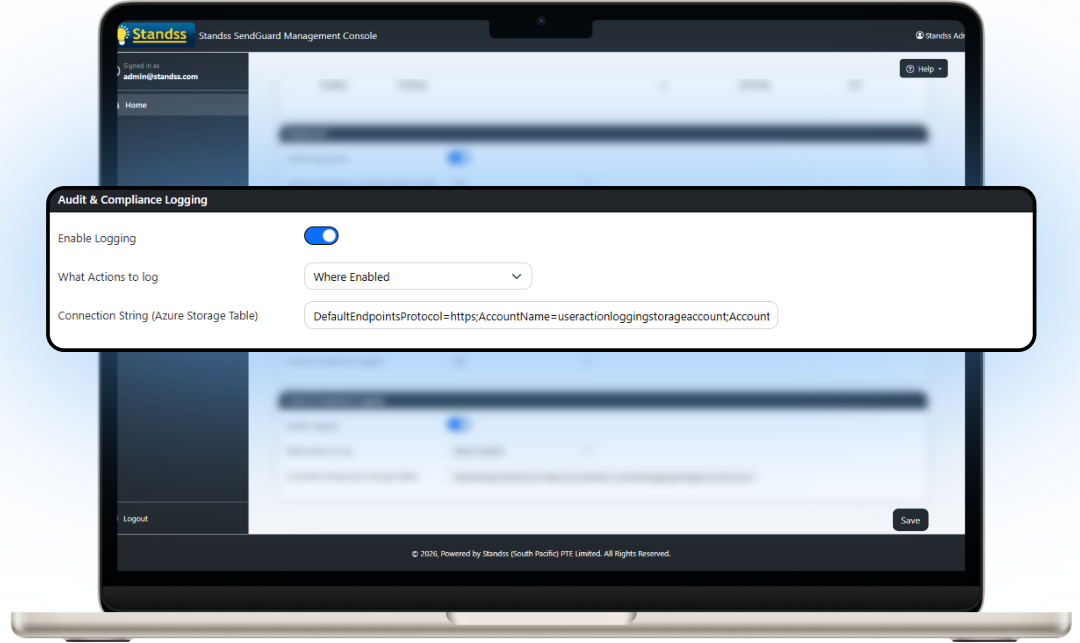
Automatically log user actions for accountability
Log replies to Windows Event Log or text files to maintain proof that warning prompts were displayed and user actions were recorded.
Built for Enterprise Deployment & Administration
Deploy and manage ReplyGuard across your organization with centralized administration tools designed for IT teams.
- ✓ Deploy with preset settings using a customized MSI
- ✓ Hide the Settings screen from end users
- ✓ Deploy using GPO, SCCM, msiexec or other deployment tools
- ✓ Centrally manage settings using ADMX/ADML templates
- ✓ Simple MSI + registry deployment for smaller networks
- ✓ Request the Administrator Guide


Now works with New Outlook and Outlook Web Access (Office 365)
SendGuard now works on New Outlook, Outlook Desktop and Outlook Web Access (OWA) for Microsoft 365 users. The New Outlook and OWA versions have the most important features of the desktop version and can be centrally deployed and managed by your Microsoft Office 365 Administrator.
SendGuard for Outlook NOW AVAILABLE on iOS and Android!


Trusted Software from a Microsoft Partner
Standss has been providing businesses with Outlook-based solutions since 2002. Our developers and support team have experience with both Outlook and NetDocuments and are ready to serve you today.
Compare Versions
Choose the appropriate version of SendConfirm or SendGuard based on your security and corporate requirements. The trial version has all features, but individual features can be turned on and off as required.
|
SendGuard Lite |
SendGuard Pro |
SendGuard Premium |
|
|---|---|---|---|
| Prompt to confirm before emails sent out |
|
||
| Prompt to confirm when recipients from multiple domains |
|
||
| Prompt when email has attachments |
|
||

Support Linked Files (OneDrive, etc.): Show Linked files attached to emails on SendConfirm prompt. |
|
|
|
|
Confirm encryption before sending email. |
|
|
|
| Attachment Guard: Insert attachment names to emails, rename attachments before sending, etc. |
|
|
|
| Set filters to control when prompt is displayed (internal emails, external emails, etc.) |
|
|
|
| Customizable message on prompt |
|
|
|
| Lock or hide settings from users |
|
|
|
| Custom branding (logo) and corporate policy link |
|
|
|
| Log result to Windows Log or text file |
|
|
|
|
Analyze logs using Power Bi or Splunk for auditing and risk assessment |
|
|
|
| Reply Guard: Prompt when Reply All clicked |
|
|
|
| Prompt for Credit Card Numbers, Social Security Numbers and any definable other text patterns |
|
|
|
| Send Rules: Run complex rules to prompt or block outgoing emails |
|
|
|
| Account Guard: Ensure emails are being sent from correct email account |
|
|
|
| Delay Guard: Delay emails in Outbox so that you can undo sends |
|
|
|
| Subject Guard: Clean subject lines of spam markings, etc. |
|
|
|
| Basic DLP: Use Send Rules to scan email subject & body for words or patterns (credit card numbers, personal health information). |
|
|
|
|
Custom Scripts for Special Checks: Based on your security needs, we can create custom scripts for your company to perform special checks on outgoing emails. |
|
|
|
|
Send Rules: Rules can be based on contents of attachments. (Click here for more information) |
|
|
|
|
Advanced DLP Scanning: All the features of Basic DLP plus ability to scan inside attachments. Also includes a Central DLP screen to scan for multiple patterns and report on one prompt. |
|
|
|

Buying for Your Team?
Volume discounts are available. Contact our sales team for a quote now.
Contact SalesFrequently Asked Questions about ReplyGuard for Outlook
If you can’t find the answer to your question below, you may find more information in our expanded product FAQs or in our Documentation and Knowledge Base section.
Refer to more information here: Does SendGuard support Outlook for Mobile Devices - Knowledge Base - Standss